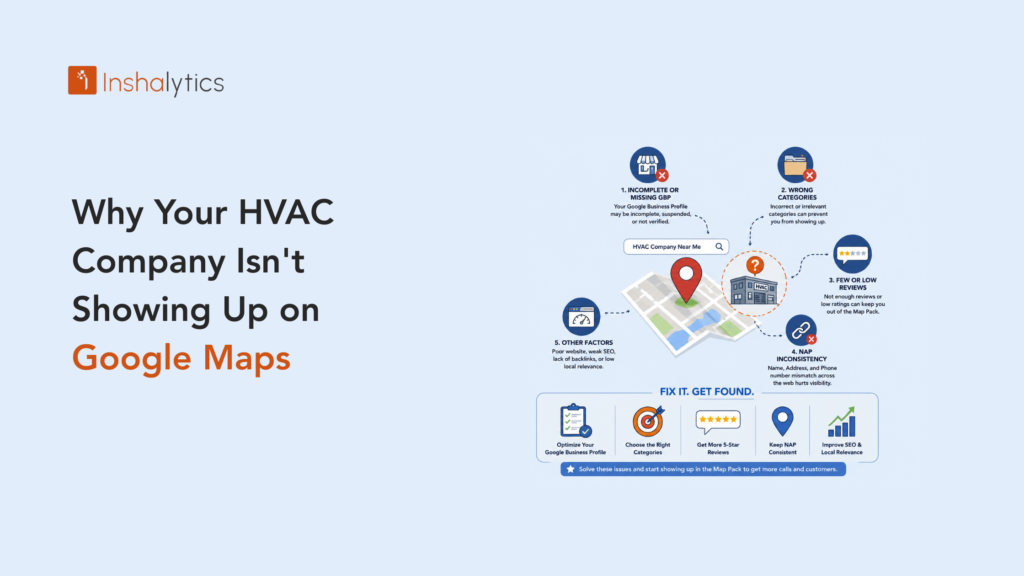
A homeowner searches “AC repair near me,” three businesses show up on the map, and yours isn’t one of them. The phone stays quiet, and the job goes to whoever did show up. This happens to good HVAC companies constantly, and it’s rarely bad luck. It’s almost always a specific, fixable issue with the Google Business Profile, the website behind it, or how consistently the business is listed across the web. In this guide, we cover HVAC not showing up on Google maps and what to do next.
This is a quick diagnostic, not a full local SEO course. Run through it in order, fix what applies, and you’ll usually know within a week or two whether the issue is solved or whether it needs a deeper look. Most of what follows takes an afternoon, not a redesign.
Start Here: Confirm Your Profile Isn’t Suspended or Unclaimed
Before touching anything else, rule out the most disruptive possibility first: a suspended, unverified, or unclaimed listing won’t show up no matter how strong everything else looks, and no amount of review-building or content work will fix it. Reviews are a major factor, covered in how many Google reviews HVAC companies need to rank.
Signs of a Suspended or Unverified Listing
A listing that used to rank and has suddenly vanished, or one that never appears even for a direct search of the business name, is often suspended or was never fully verified in the first place. Common triggers include mismatched business information, duplicate listings, or a business name that includes keywords it shouldn’t, like adding a service area or slogan into the name field.
A sudden, unexplained drop after ranking steadily for months is a strong signal to check this first, before assuming something more complicated changed.
How to Check Ownership and Verification Status
Search the business name directly in Google, and check whether the listing shows an “Own this business?” prompt or a visible verification badge. If ownership isn’t confirmed under the account actually managing the business, that’s the first thing to resolve before anything else on this list will matter.
If a suspension notice has already arrived, read it carefully rather than dismissing it. It usually names the specific policy violation, which is far faster to fix than guessing.
The Most Common Fixable Causes
If the listing is claimed and in good standing, these three issues account for the large majority of HVAC visibility problems, and all three are within direct control.
Incomplete or Miscategorized Google Business Profile
A profile missing hours, services, or photos, or one using a vague primary category instead of a specific one like HVAC Contractor, gives Google less to work with when deciding who to show for a given search. Filling every field completely and choosing the most specific accurate category is usually the single highest-impact fix available.
Secondary categories matter too. Adding relevant ones like Air Conditioning Repair Service or Furnace Repair Service, alongside the primary category, widens the range of searches the profile can surface for.
Missing or Inconsistent Service Areas
If the business serves fifteen towns but the profile only lists the main one, it simply won’t surface for searches in the other fourteen. Service areas should reflect everywhere the business genuinely operates, listed explicitly rather than assumed to be covered by proximity alone.
This is a quick field to check and update, and it’s often overlooked simply because it was set once at signup and never revisited as the service area grew.
NAP Inconsistencies Across Directories
Name, address, and phone number that don’t match exactly across Yelp, Angi, the Chamber of Commerce, and other directories create confusion for Google about which listing is authoritative. A quick audit across the major directories, correcting mismatches, cleans up a signal that’s easy to overlook and often gets worse over time as a business changes numbers or moves offices without updating every listing.
A single mismatched digit in a phone number across even one directory can be enough to muddy this signal, so the audit is worth doing carefully rather than skimming.
The Cause You Can’t Fully Control: Proximity Clustering
One factor sits outside a business’s direct control, and it’s worth naming so it doesn’t get mistaken for a fixable mistake and chased indefinitely.
Why Shared Office Parks and Zip Codes Hurt Visibility
When several HVAC businesses share a commercial district or zip code, Google’s proximity filter often surfaces only one of them for a given search, regardless of how strong the others’ profiles are. This is algorithmic, not a penalty, and there’s no direct workaround for the address itself.
This is worth recognizing early, since chasing a fix for something outside your control wastes time better spent on the things that are.
Offsetting Proximity With Stronger Authority Signals
The counter to proximity clustering is building stronger overall authority: more reviews, better citation consistency, and a website that clearly supports the business’s legitimacy. When Google has to choose between businesses in the same cluster, the one with the strongest signals is the one it tends to show, which makes this the highest-leverage response available even though it doesn’t solve the root geographic issue.
What Should You Fix First for the Fastest Visibility Recovery?
Fix in this order: verification status first, then Google Business Profile completeness, then NAP consistency, then everything else. Each step down that list takes longer to show impact but still matters, and skipping ahead rarely saves real time.
Prioritizing Fixes by Effort vs. Impact
Verification and profile completeness take an afternoon and often show movement within days. Citation cleanup across directories takes longer but compounds. Building broader authority through reviews and website strength is the slowest fix and the most durable one, worth starting even while the faster fixes are still settling in.
Working through this list in order avoids the common mistake of jumping straight to the slowest fix and losing motivation before the fast wins have had a chance to show results.
What This Costs You in Lost Booked Jobs Every Month
Every month spent invisible in the map pack is a month of high-intent, ready-to-book searches going straight to competitors. Measured against cost-per-booked-job, fixing map pack visibility is usually one of the highest-return items on an HVAC business’s entire marketing list, because the searches are already happening. The business just isn’t in front of them, which makes this closer to lost revenue than a marketing gap.
Framed this way, the fixes on this list aren’t really marketing tasks. They’re closer to recovering revenue that’s already being generated by someone else’s visibility instead of yours.
Once the Quick Fixes Are Done, Build Toward Full Local SEO
This diagnostic solves the most common visibility problems. It isn’t the whole picture, and it isn’t meant to be.
Read the Complete HVAC Google Maps Ranking Guide
For the full system behind consistently holding a top-three map pack position, not just fixing what’s currently broken, the complete guide to ranking an HVAC business on Google Maps covers the strategy end to end, including the ongoing review and content work that keeps a position once it’s won.
Think of this diagnostic as clearing the obstacles. The full guide is where the actual ranking strategy lives.
When to Bring in a Local SEO Audit Instead of Guessing
If every item on this list checks out and visibility still hasn’t improved after a few weeks, the issue likely sits somewhere a self-audit won’t catch, and a professional local SEO audit is the faster path than continuing to guess at what else might be wrong.
Most HVAC visibility problems on Google Maps trace back to a small, specific set of causes: an unverified profile, missing information, inconsistent listings, or proximity working against you. Run through them in order, fix what’s fixable, and the map pack spot that’s currently going to a competitor is very often recoverable within weeks, not months.
Not sure which of these is actually the problem for your business? Get a free Google Business Profile and Maps visibility audit and find out exactly what’s holding you back.
Frequently Asked Questions
Why isn’t my HVAC company showing up on Google Maps?
Common causes are an unverified or suspended profile, the wrong primary category, a hidden address, duplicate listings, inconsistent business details and too few reviews. Work through them in order, and use our guide to ranking your HVAC business on Google Maps for the full checklist.
How long does it take for a new Google Business Profile to show up?
A profile can appear soon after verification, but ranking well takes longer because it depends on reviews, local signals and consistent details. Keep adding reviews and updating the profile instead of expecting an immediate jump.
Can a suspended Google Business Profile be fixed?
Often, yes. Identify what broke Google’s guidelines, such as a keyword-stuffed name or an address you can’t verify, correct it, then submit a reinstatement request with accurate documentation.
Does my website affect Google Maps rankings?
Indirectly. Clear service and location pages and details that match your profile reinforce what Google associates with your business. See local SEO for HVAC contractors, and multi-location SEO if you serve several areas.