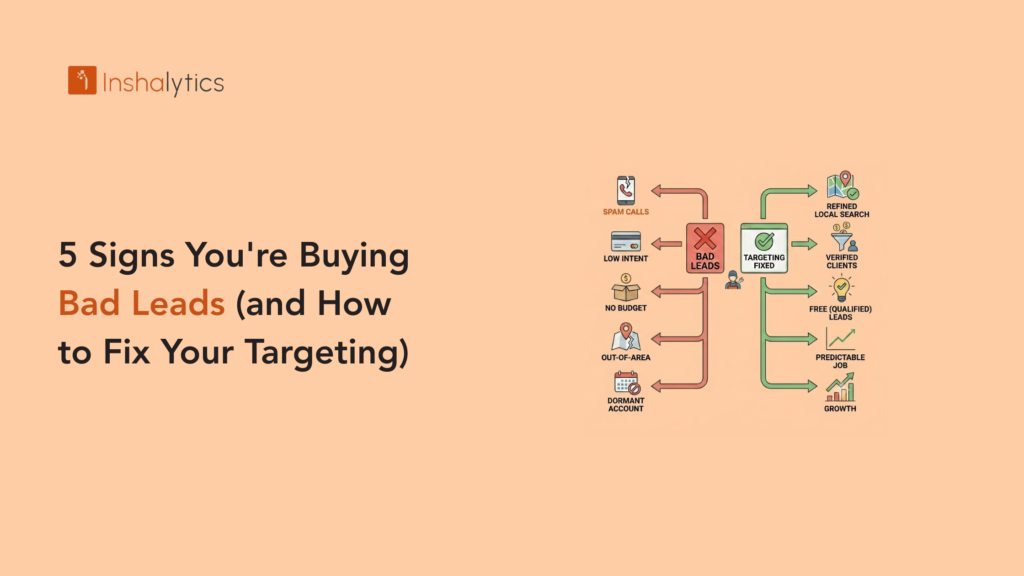
Not all bad leads are obvious. Some make it all the way to an estimate before you realise the homeowner was price shopping across six contractors and never intended to hire at your rates. Others answer the phone, sound interested, and then go silent. Others have real work, but it is the kind of work that is outside your service area, below your minimum job size, or requires a specialist you are not. Bad leads do not announce themselves at the point of purchase. They reveal themselves through wasted time, unconverted estimates, and a close rate that stays stubbornly low no matter how fast you respond or how competitive your pricing is. These five signs tell you that your targeting is producing low-quality leads and your spend is flowing toward prospects who were never going to book.
Sign 1: Your Close Rate Is Below 15% Consistently
A close rate below 15% is the clearest signal that something is structurally wrong with either your lead quality, your follow-up process, or your targeting. Industry data for handyman businesses shows that properly targeted, exclusive inbound leads convert at 30% to 50%. Shared platform leads convert at 8% to 15% under typical competitive conditions. If your close rate is consistently below 15%, you are either receiving shared leads with structural competition baked in, or your targeting is generating inquiries from homeowners who are not qualified buyers.
Distinguishing a Close Rate Problem From a Sales Process Problem
Before concluding that lead quality is the problem, confirm that your follow-up process is not the issue. A close rate below 15% can come from two very different causes: bad leads that were never going to convert, or good leads that were never properly followed up. Check your contact rate first: what percentage of leads did you actually reach by phone or text? If your contact rate is below 70%, your follow-up process (response speed, number of attempts, use of SMS alongside phone calls) is limiting your close rate regardless of lead quality. If your contact rate is above 70% and your close rate is still below 15%, the leads themselves are the problem and targeting is where to look.
How to Run a Close Rate Analysis by Lead Source
Pull 90 days of data from your lead source tracking system and calculate close rate separately for each active source. If shared platform leads close at 11% and GBP inbound leads close at 38%, you have a source problem, not a blanket targeting problem. The fix is source-level: reduce investment in low-close-rate sources, increase investment in high-close-rate sources. This analysis is only possible if every lead is correctly attributed to its source in your CRM from the first contact. If you are not tracking lead sources by channel, fixing that is the prerequisite to every other targeting improvement.
Sign 2: You Are Driving to Estimates That Do Not Convert
Free on-site estimates are a standard practice in the handyman industry, but they carry a real cost in time, fuel, and opportunity. If you are driving to three or four estimates per week and closing one of them, your estimate-to-close rate is 25% to 33%, which is below the 40% to 60% benchmark for well-qualified handyman estimates. Low estimate conversion means either your targeting is sending you unqualified prospects, or you are not screening effectively before agreeing to drive out.
What Low Estimate Conversion Usually Signals
The most common cause of low estimate conversion is homeowners who are in early research mode, not hiring mode. A homeowner who wants to understand the cost range for a bathroom renovation before deciding whether to pursue it is a legitimate prospect but not a near-term buyer. If your targeting is generating these research-mode inquiries, you are paying to educate people who have not yet decided to hire a handyman, let alone hire you. The fix is not to stop generating these leads. It is to screen them before committing to a site visit. The lead qualification guide covers the pre-visit screening process that filters research-mode inquiries from hire-mode inquiries.
The Pre-Estimate Qualification Questions That Protect Your Time
Before agreeing to drive out for any estimate, ask these three questions by phone or text: What is the job you need help with? When are you hoping to have this done? Have you had a chance to look at typical pricing for this type of work? These three questions, delivered conversationally, reveal whether the prospect has a defined scope (real job), an actual timeline (near-term buyer), and a realistic budget expectation (not looking to pay $50 for a three-hour project). Prospects who cannot answer the timeline question or who say they are “just getting a feel for prices” are research-mode inquiries. Offer them a phone consultation rather than a site visit.
Sign 3: The Same Lead Is Calling Multiple Contractors
You call back within three minutes. The homeowner answers and immediately says “I already got a quote from someone else” or “I am comparing a few options.” This is the signature of a shared platform lead: you are not the first call they received, you are the third or fifth. You paid the same amount for that lead as the first contractor who called, but your conversion probability is already significantly lower.
How to Recognise Shared Lead Behaviour on the Call
Shared lead homeowners display specific behaviours during the initial call: they ask for a price before describing the job in detail, they reference that other contractors have already given them quotes, they seem impatient or distracted when you ask qualifying questions, and they push for an immediate price comparison rather than scheduling a site visit. These are not signs of a difficult customer. They are signs of a homeowner who has been contacted by multiple contractors already and is now managing a competitive quote process. The lead was shared before you received it, and the conversation dynamic reflects that.
The Targeting Fix for Shared Lead Platforms
If you continue using platforms with shared leads, filter aggressively within the platform settings to reduce the percentage of leads that have already been distributed widely. Most platforms allow you to filter by job type, project size, and timeline. Enable filters that prioritise urgent, near-term, high-ticket leads. These will cost more per lead on the platform but produce higher close rates that lower your cost per booked job. Better still, shift budget toward exclusive lead sources where the shared lead problem does not exist by design. The alternatives to per-lead fees cover the exclusive channel options.
Sign 4: Your Leads Are Outside Your Service Area or Skill Set
Receiving a lead for work you cannot do, or a location you do not serve is pure waste: you pay the platform fee, invest time in the follow-up, and then have to decline the job. If more than 10% of your incoming leads are outside your defined parameters, your targeting setup is either incorrect or the platform is not respecting your defined boundaries.
How Incorrect Service Area Settings Generate Wasted Leads
Platforms like Angi and Thumbtack use zip codes and service radius settings to match leads to contractors. If your service area is set too broadly (including zip codes you will not serve) or your skills categories include services you do not actually perform, leads outside your real parameters will appear regularly. Review your platform settings and remove any zip codes or categories that generate leads you cannot convert. This does not reduce your lead volume in ways that matter; it eliminates spend on leads that were never going to result in booked jobs. The service area setup guide covers the correct configuration for both platforms and GBP.
How to Track Out-of-Area and Out-of-Scope Lead Rates
Add two columns to your monthly lead tracking sheet: “Out of Area” and “Out of Scope.” For every lead you receive, mark whether the job location was outside your actual service area and whether the job type was outside your service offering. Calculate these as a percentage of total leads monthly. If more than 15% of your leads are out-of-area or out-of-scope across any channel, that channel either has poor geographic or categorical targeting, or you are not set up correctly within that channel to filter them out. The fix is always configuration first, not channel elimination.
Sign 5: Your Leads Come From the Wrong Intent Signals
Not every homeowner who submits a lead form or searches for a handyman is in hire mode. Some are in research mode (gathering price information), comparison mode (building a list of options without intent to hire soon), or browsing mode (looking at service options without a specific job in mind). Targeting that captures too many of these low-intent signals produces leads with structurally low close rates regardless of how well you follow up.
What Low-Intent Lead Sources Look Like
Low-intent leads typically arrive through broad keyword searches without local or urgency modifiers (“handyman jobs” rather than “handyman near me”), from informational content that attracts browsers rather than buyers, from social media browsing campaigns where the user had no active hiring intent before seeing your ad, and from certain platform prompts that encourage homeowners to submit quote requests without fully considering whether they are ready to hire. High-intent leads arrive through local-modifier searches (“handyman in ” or “handyman near me”), emergency or urgent need searches, and direct navigation to your GBP or website.
How to Fix Targeting to Capture High-Intent Signals
For Google Ads: review your search term report monthly and add negative keywords for any terms that indicate research rather than hiring intent (terms like “how much does,” “average cost of,” “DIY,” and “handyman jobs” for employment seekers). For platform targeting: prioritise leads tagged as “urgent” or “need service soon” rather than “gathering quotes.” For GBP and local SEO: the content that ranks for “handyman near me” and “[service] ” searches already captures high-intent homeowners in hire mode. Increasing your visibility in these channels increases the proportion of high-intent leads in your pipeline without requiring targeting adjustments.
How Inshalytics Fixes Handyman Lead Targeting
Poor lead quality is almost always a targeting problem, not a market problem. The homeowners who need handyman services in your area are there. The question is which channels and which configurations are connecting you with the ones who are in hire mode rather than research mode. Inshalytics audits lead source performance by close rate, identifies the channels and configurations generating low-intent leads, and shifts investment toward the sources and settings that produce exclusive, high-intent inquiries. We also implement lead source tracking that makes close rate analysis by source possible from day one, because you cannot fix what you cannot measure.
Is your close rate telling you something is wrong with your targeting? Talk to Inshalytics about a lead quality audit for your handyman business.