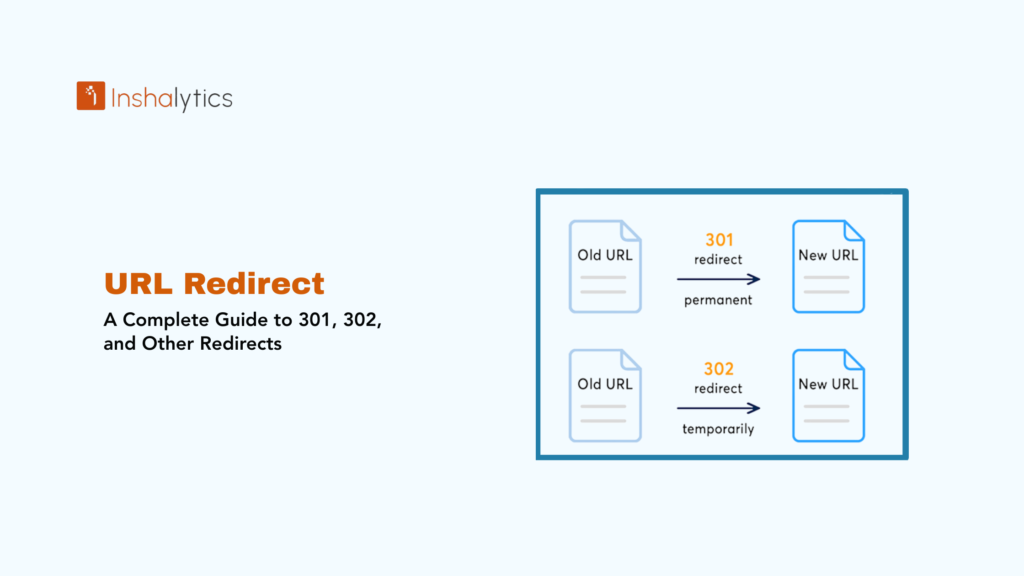
A redirect is a server-side technique that automatically forwards visitors and search engines from one URL to another. When a user or search engine bot attempts to access a specific URL, the server responds by sending them to a different URL instead. Redirects are essential for maintaining SEO value when pages move, consolidating duplicate content, fixing broken links, and managing website restructures without losing traffic or rankings.
The most common types of redirects are 301 (permanent redirect) and 302 (temporary redirect), each serving different purposes and having distinct SEO implications. Understanding when and how to use redirects properly is crucial for preserving search rankings, link equity, and user experience during website changes.
Navigate This Post
Why Redirects Matter for SEO
Redirects play a critical role in maintaining website health and search engine performance:
Preserve Link Equity – When other sites link to your pages, those backlinks carry SEO value. Proper redirects pass most of that link equity to the new URL, maintaining your rankings.
Prevent 404 Errors – Broken links frustrate users and signal poor site maintenance to search engines. Redirects ensure visitors reach relevant content even when URLs change.
Consolidate Duplicate Content – Multiple URLs with similar content can dilute ranking power. Redirects consolidate signals to a single authoritative version.
Maintain User Experience – Visitors following outdated links from bookmarks, social media, or other sites reach the intended content seamlessly.
Facilitate Site Migrations – During domain changes, site restructures, or platform migrations, redirects ensure continuity of traffic and rankings.
Track and Manage Traffic – Redirects can route traffic strategically, such as sending mobile users to mobile-optimized pages or directing regional visitors to localized content.
Types of Redirects
301 Redirect (Permanent)
A 301 redirect indicates that a page has permanently moved to a new location. This is the most important redirect type for SEO.
When to Use 301 Redirects:
- Permanently moving a page to a new URL
- Changing your domain name
- Consolidating multiple pages into one
- Switching from HTTP to HTTPS
- Removing old product pages and directing to current alternatives
- Eliminating duplicate content by canonicalizing URLs
- Restructuring your site architecture
SEO Impact: Google states that 301 redirects pass full link equity (PageRank) to the destination URL. While there may be minimal signal loss, properly implemented 301 redirects maintain nearly all ranking power.
Example: Your old product page example.com/old-product permanently redirects to example.com/new-product. Search engines update their indexes to show the new URL, and backlinks to the old URL benefit the new page.
HTTP Status Code: 301 Moved Permanently
302 Redirect (Temporary)
A 302 redirect indicates that a page has temporarily moved to a different location, with the intention of eventually returning to the original URL.
When to Use 302 Redirects:
- Running A/B tests where you’ll revert to the original page
- Temporarily redirecting for seasonal content
- Testing a new page design before permanent implementation
- Maintenance or updates requiring temporary page unavailability
- Limited-time promotions or landing pages
- Temporarily redirecting while resolving technical issues
SEO Impact: 302 redirects do not pass full link equity because search engines expect the original URL to return. Search engines typically continue indexing the original URL rather than the destination.
Example: During a holiday sale, example.com/products temporarily redirects to example.com/holiday-sale. After the promotion ends, the redirect is removed.
HTTP Status Code: 302 Found (or 307 Temporary Redirect in HTTP/1.1)
307 Redirect (Temporary – HTTP/1.1)
Similar to 302 but explicitly maintains the HTTP method (GET, POST, etc.) during the redirect. More technically precise than 302 for modern applications.
When to Use:
- Temporary redirects requiring method preservation
- API endpoints temporarily redirecting
- Form submissions that need to maintain POST data
308 Redirect (Permanent – HTTP/1.1)
Similar to 301 but maintains the HTTP method during redirection. The modern, technically precise alternative to 301.
When to Use:
- Permanent redirects requiring method preservation
- RESTful API endpoint changes
- Modern web applications prioritizing technical precision
Meta Refresh Redirect
A page-level redirect executed through HTML meta tags or JavaScript rather than server-side configuration. Generally slower and less SEO-friendly.
When to Use:
- When server-side redirects aren’t accessible
- Creating a countdown before redirecting
- Client-side applications where server control is limited
SEO Impact: Meta refreshes with 0-second delays are treated similarly to 301 redirects, but instant server-side redirects are preferred. Delayed meta refreshes can confuse users and search engines.
JavaScript Redirect
Redirects executed through JavaScript code rather than server configuration.
When to Use:
- Single-page applications (SPAs)
- Conditional redirects based on user behavior
- When server access is restricted
SEO Impact: Google can process JavaScript redirects, but they’re slower and less reliable than server-side redirects. Use server-side redirects whenever possible.
How to Implement Redirects
Apache (.htaccess)
For websites running on Apache servers, redirects are typically implemented in the .htaccess file:
# 301 Permanent Redirect
Redirect 301 /old-page.html https://example.com/new-page.html
# Redirect entire domain
RewriteEngine On
RewriteCond %{HTTP_HOST} ^oldsite\.com$ [OR]
RewriteCond %{HTTP_HOST} ^www\.oldsite\.com$
RewriteRule ^(.*)$ https://newsite.com/$1 [R=301,L]
# Redirect HTTP to HTTPS
RewriteEngine On
RewriteCond %{HTTPS} off
RewriteRule ^(.*)$ https://%{HTTP_HOST}%{REQUEST_URI} [L,R=301]
Nginx
For Nginx servers, redirects are configured in the server configuration file:
# 301 Permanent Redirect
location /old-page {
return 301 https://example.com/new-page;
}
# Redirect entire domain
server {
server_name oldsite.com www.oldsite.com;
return 301 https://newsite.com$request_uri;
}
WordPress Plugins
WordPress users can implement redirects through plugins:
- Redirection – User-friendly plugin for managing redirects
- Yoast SEO Premium – Includes redirect manager
- Rank Math – Free SEO plugin with redirect functionality
Content Management Systems
Most modern CMS platforms offer built-in redirect management:
- Shopify – URL redirects section in admin panel
- Wix – URL Redirect Manager tool
- Squarespace – URL mappings feature
PHP
Server-side redirects can be implemented in PHP:
<?php
// 301 Permanent Redirect
header(“HTTP/1.1 301 Moved Permanently”);
header(“Location: https://example.com/new-page”);
exit();
// 302 Temporary Redirect
header(“Location: https://example.com/temporary-page”);
exit();
?>
Redirect Best Practices
1. Choose the Correct Redirect Type
Use 301 for permanent changes and 302 for temporary situations. Misusing redirect types confuses search engines and can result in lost rankings.
2. Redirect to the Most Relevant Page
Direct users to the most closely related content available. If removing a specific product page, redirect to the category page or similar product rather than the homepage.
3. Avoid Redirect Chains
A redirect chain occurs when one redirect leads to another, which leads to yet another. Example: URL A → URL B → URL C. This slows page loading, dilutes link equity, and wastes crawl budget.
Fix redirect chains:
- Redirect all old URLs directly to the final destination
- Regularly audit redirect paths
- Update redirects when destination URLs change
4. Minimize Redirect Loops
Redirect loops occur when URL A redirects to URL B, which redirects back to URL A, creating an infinite loop that breaks user access and confuses search engines.
Prevention:
- Test all redirects after implementation
- Use redirect checking tools
- Document redirect rules to avoid conflicts
5. Update Internal Links
While redirects handle external links you can’t control, update internal links to point directly to the new URLs. This improves page speed and reduces redirect dependence.
6. Monitor Redirect Performance
Regularly check:
- Response times for redirected URLs
- Whether redirects are functioning correctly
- Redirect chains or loops
- 404 errors from broken redirects
7. Maintain Redirects Long-Term
Don’t remove redirects too quickly. Backlinks, bookmarks, and cached search results may reference old URLs for years. Maintain important redirects indefinitely.
8. Document Your Redirects
Keep a spreadsheet tracking:
- Old URL
- New URL
- Redirect type
- Implementation date
- Reason for redirect
This documentation prevents confusion during future site updates.
Common Redirect Mistakes
Using 302 Instead of 301
The most common error is using temporary (302) redirects for permanent URL changes. This prevents link equity transfer and maintains the old URL in search indexes.
Redirecting Everything to the Homepage
During site redesigns, lazy implementations redirect all old URLs to the homepage. This provides poor user experience and wastes valuable link equity.
Not Redirecting HTTP to HTTPS
After implementing SSL, failing to redirect HTTP to HTTPS creates duplicate content issues and splits link equity between versions.
Forgetting About Subdomain and Protocol Variations
Ensure redirects handle all URL variations:
- www vs. non-www
- HTTP vs. HTTPS
- Trailing slash vs. no trailing slash
Redirect Chains from Sequential Changes
Making multiple site changes without updating redirects creates chains:
- Original: example.com/page-v1
- First change: Redirects to example.com/page-v2
- Second change: v2 redirects to example.com/page-v3
Solution: Update the first redirect to point directly to v3.
Redirecting Too Many Pages
Mass redirecting hundreds of pages simultaneously can trigger search engine scrutiny. Implement large-scale redirects in phases when possible.
Testing and Troubleshooting Redirects
Testing Tools
HTTP Status Code Checkers:
- Redirect Checker by Redirect Detective
- HTTP Status Code Checker by SmallSEOTools
- Screaming Frog SEO Spider (bulk checking)
Browser Developer Tools:
- Network tab shows redirect chains and status codes
- Provides detailed redirect information
Command Line:
curl -I https://example.com/old-page
Common Issues and Solutions
Redirect Not Working:
- Check server configuration syntax
- Clear browser cache
- Verify file permissions
- Confirm server supports redirect methods
Redirect Chain Detected:
- Trace the full redirect path
- Update initial redirect to point to final destination
- Remove intermediate redirects
Search Engines Not Recognizing Redirect:
- Verify 301 status code is properly returned
- Submit updated sitemap to Google Search Console
- Request reindexing of affected pages
Conclusion
Redirects are essential tools for maintaining SEO value, user experience, and site integrity during URL changes. The key to effective redirect implementation lies in choosing the appropriate redirect type primarily 301 for permanent changes and 302 for temporary situations and following best practices to avoid common pitfalls like redirect chains, loops, and irrelevant destinations.
Properly configured redirects preserve link equity, maintain search rankings, and ensure visitors reach the content they’re seeking regardless of which URL they use. Whether you’re migrating domains, restructuring your site, or simply updating individual page URLs, implementing redirects correctly protects years of SEO investment and provides seamless experiences for users.
Regular monitoring, documentation, and maintenance of your redirect strategy ensures long-term success and prevents the gradual accumulation of redirect issues that can harm performance over time.
Key Takeaway: Redirects automatically forward users and search engines from one URL to another, with 301 redirects used for permanent moves (passing full link equity) and 302 redirects for temporary changes (maintaining the original URL in indexes). Proper redirect implementation is essential for preserving SEO value, preventing 404 errors, and maintaining user experience during website changes.