
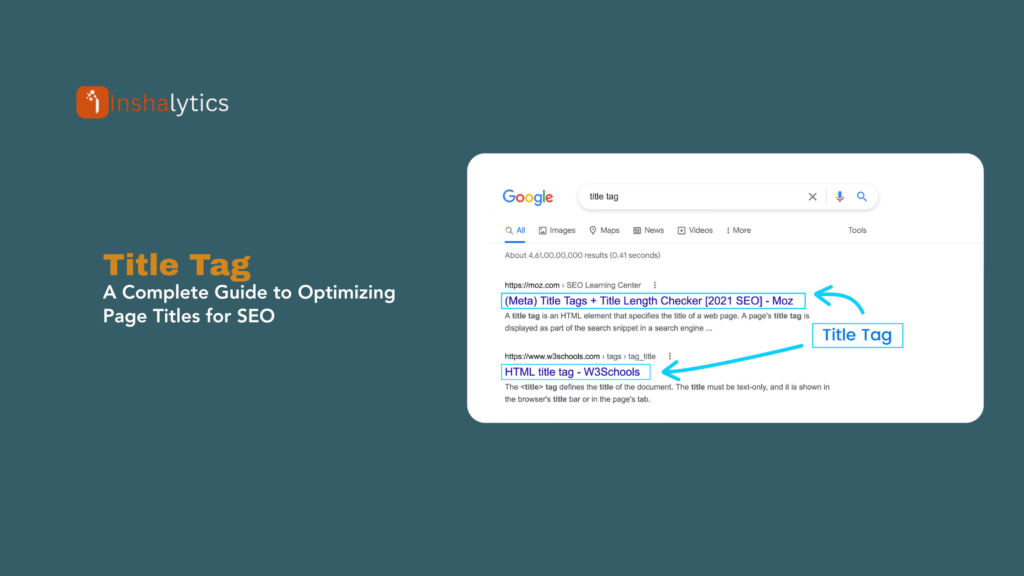
A title tag is an HTML element that specifies the title of a webpage, appearing as the clickable headline in search engine results, the text in browser tabs, and the default title when pages are shared on social media. Written within the <head> section of HTML code as <title>Your Page Title</title>, this element serves as one of the most important on-page SEO factors, directly influencing both search engine rankings and click-through rates. An effective title tag accurately describes page content while incorporating target keywords and compelling language that encourages clicks.
Title tags are often the first impression users have of your content, making them crucial for both SEO performance and user engagement. Search engines display title tags as the blue clickable link in search results, and users rely on them to determine whether a page matches their search intent. Well-optimized title tags can dramatically improve your visibility, traffic, and conversion rates, while poorly crafted titles waste ranking potential and drive users to competitors.
Navigate This Post
Why Title Tags Matter
Primary Ranking Signal
Title tags are one of the strongest on-page SEO ranking factors. Search engines analyze title content to understand page topics and determine relevance for specific queries. Including target keywords in titles directly impacts ranking potential.
Click-Through Rate Impact
Even with high rankings, poor title tags result in low CTRs. Compelling titles that clearly communicate value and match search intent significantly outperform generic or vague alternatives. Studies show optimized titles can increase CTR by 20-50%.
First User Impression
Title tags are typically the first element users see in search results. They make split-second decisions about clicking based on title relevance, clarity, and appeal. Your title tag is your primary marketing message in search.
Social Media Sharing
When pages are shared on Facebook, Twitter, LinkedIn, and other platforms, title tags often serve as the default shared headline (unless overridden by Open Graph tags).
Browser Tab Identification
Title tags appear in browser tabs, helping users identify and switch between multiple open pages. Clear, concise titles improve user navigation and reduce tab confusion.
Bookmark and History Reference
Browsers use title tags for bookmark names and history entries. Descriptive titles make finding saved pages easier.
Title Tag Best Practices
Optimal Length: 50-60 Characters
Why This Matters: Google typically displays 50-60 characters (approximately 600 pixels) before truncating with an ellipsis (…). Longer titles get cut off, hiding important information.
Examples:
Good (56 characters):
<title>Best Running Shoes for Flat Feet | 2024 Guide</title>
Too Long (78 characters – truncated in results):
<title>The Ultimate Complete Guide to Finding the Best Running Shoes for People with Flat Feet</title>
Displays as: “The Ultimate Complete Guide to Finding the Best Running Shoes f…”
Character Count Tips:
- Aim for 50-60 characters including spaces
- Place critical keywords and brand name within first 50 characters
- Front-load the most important information
- Use pixel-width checkers for accuracy (characters vary in width)
Include Target Keywords Early
Position primary keywords near the beginning of title tags for maximum SEO impact and visibility before potential truncation.
Effective Keyword Placement:
Good:
<title>Email Marketing Automation | Save Time & Boost ROI</title>
Primary keyword (“Email Marketing Automation”) appears first
Less Effective:
<title>Learn How to Save Time and Increase ROI with Email Marketing Automation</title>
Keyword buried after filler words; likely truncated
Keyword Strategies:
- Primary keyword in first 5 words
- Natural integration, not keyword stuffing
- Use variations and long-tail keywords
- Match search intent for target queries
Make Each Title Unique
Every page should have a distinct title tag describing its specific content. Duplicate titles confuse search engines and users, waste ranking opportunities, and create poor user experiences.
Common Duplicate Title Issues:
Problem:
<!– Homepage –>
<title>Acme Company</title>
<!– Products Page –>
<title>Acme Company</title>
<!– About Page –>
<title>Acme Company</title>
Solution:
<!– Homepage –>
<title>Acme Company | Professional Web Design Services</title>
<!– Products Page –>
<title>Web Design Packages & Pricing | Acme Company</title>
<!– About Page –>
<title>About Our Design Team | Acme Company</title>
Match Search Intent
Title tags must accurately reflect page content and match what users expect when searching specific queries. Misleading titles increase bounce rates, harm user trust, and can trigger ranking penalties.
Intent Types:
Informational Intent:
<title>What is SEO? Complete Beginner’s Guide to Search Optimization</title>
Navigational Intent:
<title>Gmail Login | Access Your Email Account</title>
Commercial Intent:
<title>Best CRM Software 2024 | Top 10 Platforms Compared</title>
Transactional Intent:
<title>Buy Organic Coffee Beans | Free Shipping | Roasted Daily</title>
Include Branding Strategically
Adding brand names improves recognition and builds trust, especially for known brands. However, placement depends on brand strength and page importance.
Branding Strategies:
Strong Brands – Front Position:
<title>Nike Running Shoes | Men’s & Women’s Sneakers</title>
Building Brands – End Position:
<title>Affordable Web Hosting Plans | TechHost Solutions</title>
Homepage – Brand Focus:
<title>Acme Corporation | Leading Software Development Company</title>
Content Pages – Keyword Focus:
<title>How to Increase Email Open Rates | Marketing Blog | Acme Corp</title>
When to Skip Branding:
- Very long brand names consuming character space
- Non-branded pages targeting generic keywords
- Landing pages optimized for specific campaigns
Use Modifiers for Long-Tail Keywords
Strategic modifiers expand keyword targeting and match specific search variations.
Effective Modifiers:
- Year: “Best Laptops 2024”
- Location: “Chicago Web Design Services”
- Price: “Affordable,” “Cheap,” “Premium,” “Luxury”
- Quality: “Best,” “Top,” “Professional”
- Format: “Guide,” “Tutorial,” “Checklist,” “Template”
- Action: “How to,” “Learn,” “Buy,” “Get”
Examples:
<title>Best Free SEO Tools 2024 | Ultimate Guide for Beginners</title>
<title>Affordable Wedding Photography Chicago | Top Rated</title>
<title>How to Write a Resume | Professional Template & Examples</title>
Avoid Keyword Stuffing
Overloading titles with keywords appears spammy, reduces readability, may trigger penalties, and decreases click-through rates.
Keyword Stuffing (Bad):
<title>SEO Services, SEO Company, SEO Expert, Best SEO, Local SEO, SEO Agency</title>
Optimized (Good):
<title>Professional SEO Services | Local & National Campaigns | SEO Agency Name</title>
Create Compelling, Clickable Titles
Beyond SEO optimization, titles must entice clicks through clear value propositions, emotional appeal, and curiosity.
Techniques:
Numbers and Lists:
<title>7 Email Marketing Mistakes That Kill Conversions</title>
Questions:
<title>Is Your Website Mobile-Friendly? Free Testing Tool</title>
Power Words:
<title>Ultimate Guide to Instagram Marketing | Proven Strategies</title>
Benefits and Results:
<title>Double Your Email List in 30 Days | Growth Strategies</title>
Urgency or Scarcity:
<title>Black Friday Sale: 60% Off | Limited Time Offer</title>
Title Tag Implementation
HTML Code
Title tags belong in the <head> section of HTML:
<!DOCTYPE html>
<html lang=”en”>
<head>
<meta charset=”UTF-8″>
<meta name=”viewport” content=”width=device-width, initial-scale=1.0″>
<title>Your Page Title Here | Brand Name</title>
<meta name=”description” content=”Your meta description here”>
</head>
<body>
<!– Page content –>
</body>
</html>
Content Management Systems
WordPress:
- SEO plugins (Yoast SEO, Rank Math, All in One SEO)
- Manual editing in post/page editor
- Theme customization options
Shopify:
- Page editor “Search engine listing preview”
- Theme code customization
- SEO apps for bulk editing
Wix, Squarespace, Weebly:
- Built-in SEO settings for each page
- Page properties editor
Programmatic Title Generation
For large sites, dynamically generate titles using templates:
E-commerce Product Pages:
{Product Name} | {Category} | {Brand Name}
Example: iPhone 15 Pro Max | Smartphones | TechStore
Blog Posts:
{Post Title} | {Category} | {Site Name}
Example: 10 SEO Tips | Digital Marketing Blog | Marketing Hub
Location Pages:
{Service} in {City}, {State} | {Company Name}
Example: Plumbing Services in Austin, TX | Reliable Plumbers
Common Title Tag Mistakes
Using Default or Generic Titles
Problem:
<title>Home</title>
<title>Page 1</title>
<title>Untitled Document</title>
Impact: Wastes prime SEO opportunity, provides no value to users, appears unprofessional.
Duplicate Titles Across Pages
Problem: Multiple pages sharing identical title tags.
Impact: Search engines can’t distinguish pages, internal competition for rankings, wasted ranking potential.
Missing Title Tags
Problem: Pages without title tags display URLs in search results.
Impact: No ranking optimization, extremely poor CTR, unprofessional appearance.
Keyword Stuffing
Problem:
<title>Pizza, Best Pizza, Pizza Delivery, Cheap Pizza, Pizza Near Me, Pizza Restaurant</title>
Impact: Appears spammy, reduces readability, may trigger penalties, discourages clicks.
All Caps or Excessive Punctuation
Problem:
<title>BEST DEALS!!! LOWEST PRICES!!! BUY NOW!!!</title>
Impact: Appears unprofessional and spammy, harder to read, reduces user trust.
Not Matching Page Content
Problem: Title promises content that doesn’t exist on page (clickbait).
Impact: High bounce rates, poor user experience, potential ranking penalties, loss of trust.
Monitoring and Testing Title Tags
Google Search Console
Monitor title tag performance:
- Click-through rates by page
- Impressions and average position
- Title tag rendering issues
- Pages with duplicate titles
A/B Testing Titles
Test title variations to optimize CTR:
- Change one element at a time
- Test for minimum 2-4 weeks
- Measure CTR changes in Search Console
- Consider seasonal variations
Testing Variables:
- Keyword placement
- Title length
- Modifier inclusion
- Brand position
- Emotional triggers
Title Rewriting by Google
Google sometimes rewrites title tags based on:
- Query relevance
- Page content analysis
- Anchor text from backlinks
- H1 heading content
If Google Rewrites Your Title:
- Check if your title is too long
- Ensure title matches page content
- Verify title isn’t keyword-stuffed
- Review H1 tags for consistency
- Consider if Google’s version performs better
Title Tags vs. H1 Tags
While related, title tags and H1 tags serve different purposes:
Title Tag:
- HTML <title> element in <head> section
- Appears in search results and browser tabs
- Primary focus: SEO and click-through
- Not visible on the page itself
- Can differ from on-page headline
- HTML <h1> element in <body> section
- Main visible headline on the page
- Primary focus: User experience and content hierarchy
- Visible to page visitors
- Should align with but needn’t duplicate title tag
Best Practice: Keep title tags and H1s similar but optimize each for their specific purpose—title tags for search results, H1s for on-page experience.
Conclusion
Title tags represent one of the most critical on-page SEO elements, directly influencing both search engine rankings and user click-through rates. These HTML elements serve as your primary marketing message in search results, making the difference between a click and a scroll past your listing. Optimizing title tags requires balancing multiple factors: keyword inclusion for SEO, compelling language for clicks, appropriate length to avoid truncation, unique content for each page, and accurate representation of page content.
The most effective title tags position target keywords early, stay within 50-60 characters, match search intent, include strategic modifiers, and use compelling language that encourages clicks while accurately representing page content. Regular monitoring through Google Search Console reveals performance opportunities and identifies issues like duplicates or low CTRs that require attention.
As search engines evolve and competition intensifies, title tag optimization remains a fundamental practice that delivers measurable results. Invest time in crafting unique, optimized titles for every important page, test variations to improve performance, and maintain consistency between what you promise in titles and what users find on your pages.
Key Takeaway: Title tags are HTML elements (<title>) in the <head> section specifying webpage titles that appear as clickable headlines in search results, browser tabs, and social shares. Limited to 50-60 visible characters, optimized title tags include target keywords early, match search intent, remain unique per page, and use compelling language to maximize both SEO rankings and click-through rates, making them one of the most important on-page optimization elements.







