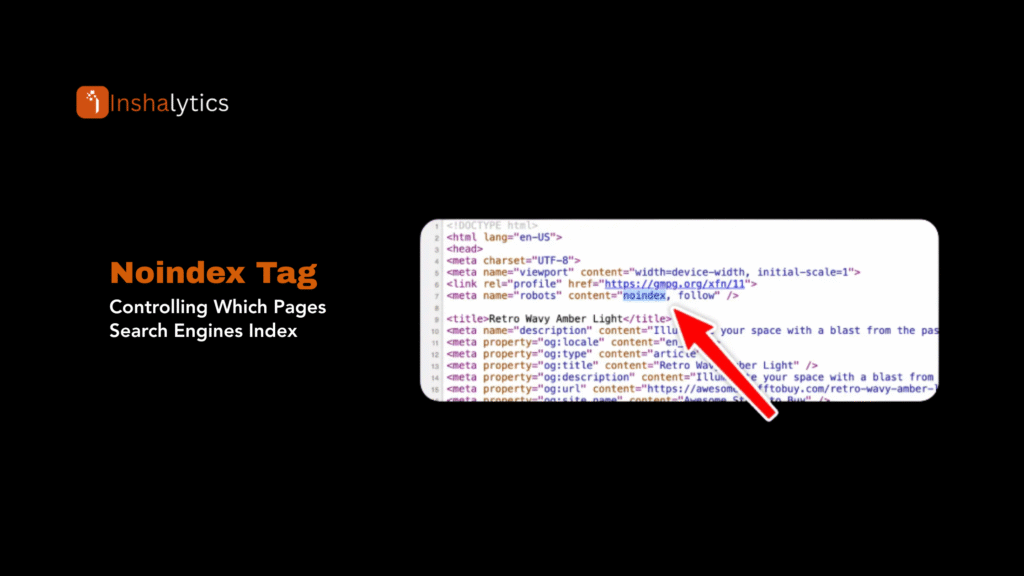
The noindex tag is one of the most consequential directives in technical SEO and one of the most commonly misapplied. Used correctly, it keeps low-value pages out of Google’s index and concentrates your crawl budget on content that matters. Used incorrectly, it silently removes your most important pages from search results with no warning and no immediate error in Google Search Console.
4,468 impressions. 2 clicks. That’s the GSC signal this page is sending right now massive search visibility with near-zero conversion to traffic. The queries flooding in are highly technical and specific: noindex directives, meta noindex, noindex follow, noindex canonical, noindex paginated pages, htaccess noindex, google search central noindex meta tag documentation. These aren’t people looking for a definition. They’re developers and SEOs looking for exact syntax, implementation decisions, and edge case guidance. This guide delivers that.
What Is Noindex?
Noindex is a robots directive that instructs search engines not to include a specific page in their index. A page with a noindex directive will not appear in search results not for any query, not in any position even if Googlebot crawls it and can read its full content.
Noindex can be delivered two ways:
1. HTML meta robots tag placed in the <head> of the page:
html
<meta name=”robots” content=”noindex”>
2. X-Robots-Tag HTTP response header sent by the server with the page response:
X-Robots-Tag: noindex
Both methods tell Google the same thing. The meta tag is the standard implementation for HTML pages. The X-Robots-Tag header is used for non-HTML files (PDFs, images, feeds) where you can’t place HTML in the document head.
Critical distinction: noindex affects indexing, not crawling. Googlebot will still visit and crawl a noindexed page. It reads the directive on that crawl and then excludes the page from its search engine index. The page exists, loads normally for users, and can receive links it simply won’t rank for anything.
The Complete Noindex Syntax Reference
This section covers every combination of noindex directives that appear in the GSC query data.
Meta Robots Tag Variants
Noindex only allows link-following:
html
<meta name=”robots” content=”noindex”>
Google will not index the page but will follow its outbound links and pass link signals through them.
Noindex + Follow (explicit):
html
<meta name=”robots” content=”noindex, follow”>
Identical in effect to noindex alone. follow is the default behavior, stating it explicitly makes the intent clear in the codebase. Use this format when you want to document that link-following is intentional.
Noindex + Nofollow:
html
<meta name=”robots” content=”noindex, nofollow”>
Google will not index the page and will not follow or pass authority through any links on the page. Use this for pages that should be completely isolated from the crawl graph admin panels, login pages, internal tool pages, and private content that should not contribute to link equity flow.
Noindex + Nofollow + No snippet:
html
<meta name=”robots” content=”noindex, nofollow, nosnippet”>
Adds suppression of any text or image snippet Google might generate for the page. Rarely needed but relevant for confidential documents that might still be referenced.
X-Robots-Tag HTTP Header Variants
For PHP-served pages:
php
header(‘X-Robots-Tag: noindex’, true);
header(‘X-Robots-Tag: noindex, nofollow’, true);
For Apache (.htaccess):
apache
<Files “page.html”>
Header set X-Robots-Tag “noindex”
</Files>
For Nginx:
nginx
location /private/ {
add_header X-Robots-Tag “noindex, nofollow”;
}
The .htaccess noindex approach is useful for applying noindex to entire directories or file types at the server level without modifying individual page templates.
Googlebot-Specific Noindex
You can target individual crawlers rather than all bots:
html
<meta name=”googlebot” content=”noindex”>
This affects only Google’s crawler. Bing’s bot (Bingbot), and other crawlers will still index the page. Use this only when you have a specific reason to exclude the page from Google but keep it in other indexes, rare in practice.
Noindex in Robots.txt Why It Doesn’t Work
A critical misconception: you cannot implement noindex via robots.txt. Robots.txt controls crawling access, not indexing instructions. A Disallow rule in robots.txt prevents Googlebot from visiting the page, meaning it cannot read the noindex directive even if one exists in the page’s HTML.
The danger: if you disallow a page in robots.txt AND add a noindex meta tag, Google may still index the page because it cannot read the noindex tag it’s been blocked from seeing. This is one of the most common technical SEO mistakes on large sites.
Rule: Use robots.txt to block pages you don’t want crawled at all. Use noindex meta tags for pages you want crawled but not indexed. Never use both on the same page with the intention of blocking indexation.
Noindex vs. Password Protection
Password-protecting a page is the most reliable way to prevent indexation because Googlebot cannot access the content at all. Unlike noindex, which relies on Google honoring the directive, password protection is a hard technical barrier. Use it for staging environments, client portals, and members-only content. Never rely on noindex alone to protect genuinely sensitive information.
When to Use Noindex
Pages That Should Be Noindexed (Standard Cases)
Thank-you and confirmation pages post-conversion pages that only make sense in context of a form submission. They have no independent search value and appearing in results creates a broken user journey for anyone landing on them without having completed the preceding action.
Internal search results pages site.com/search?q=query pages create near-infinite duplicate content variations and have no standalone search value. Noindex all internal search result URLs.
Paginated pages beyond page one: the GSC data shows noindex paginated pages as an explicit query. The guidance here has evolved. Noindexing paginated pages (page 2, 3, etc.) is a reasonable strategy for thin archive pages, but it can suppress indexation of genuinely useful content on later pages. The recommended approach: allow indexation of paginated pages that contain unique, valuable content. Noindex only pages where the paginated content is purely navigational with no unique value.
Filtered and faceted navigation pages on e-commerce and directory sites with URL parameter-driven filtering (?color=red&size=M) create hundreds of duplicate-intent pages. Noindex parameter-driven filter combinations while allowing indexation of primary category pages.
Duplicate content variations printer-friendly versions, mobile-specific URLs (if not using responsive design), and session ID-appended URLs should all be noindexed to prevent duplicate content dilution.
Staging and development environments: every staging site must have noindex on all pages before any content goes live. Configure this at the environment level, not page by page.
Login, cart, and checkout pages are functional pages with no informational search value. Noindex these and also consider nofollow to prevent crawl budget consumption on transactional paths that never lead to indexable content.
Tag archive pages with thin content: WordPress tag pages with only one or two posts produce thin content that competes with your main category pages. Noindex tag pages unless they aggregate substantial, unique content.
Category archives with no unique content no index categories technical seo appeared directly in the GSC query data. Category pages that simply list post titles with excerpts and no unique introductory content are candidates for noindex. Category pages with substantial unique descriptions, curated content, and genuine topical depth should be indexed.
Pages That Should NOT Be Noindexed
Any page generating organic traffic: check Google Search Console before noindexing. A page you consider low-value may be generating clicks you aren’t aware of.
Pillar pages and cornerstone content: these are the highest-value indexable pages on the site. Accidentally noindexing a pillar page causes immediate, steep traffic loss.
Pages with valuable backlinks: external backlinks pointing to a noindexed page still flow link equity through that page’s outbound followed links, but the page itself cannot rank. If a page has earned valuable backlinks, index it or redirect it to a page that can capture that equity in rankings.
Noindex + Follow vs. Noindex + Nofollow: Making the Right Call
The noindex follow combination (323 impressions at position 35 in GSC) is the most searched nuance in this topic. Here’s the decision framework:
Use noindex, follow when:
- The page has links to other valuable pages you want Google to discover and follow
- It’s a hub or navigation page with no standalone search value but good outbound link structure
- You want link equity to continue flowing through the page to its destinations
- Examples: Thank-you pages that link to related resources, internal search results pages, tag archives
Use noindex, nofollow when:
- The page is completely isolated from your content strategy
- Links on the page point to low-value or irrelevant destinations
- The page is a login, admin, or private utility page
- You want to actively prevent crawl budget consumption on the page and its outbound links
- Examples: Admin panels, login pages, private portals, staging pages
The default is follow. When you write <meta name=”robots” content=”noindex”> without specifying follow or nofollow, Google treats it as noindex, follow. Links on the page will be followed and equity will flow. Make this explicit in your markup if the distinction matters to your team’s code review process:
html
<!– Explicit follow links are crawled and followed –>
<meta name=”robots” content=”noindex, follow”>
<!– Explicit nofollow links are not followed –>
<meta name=”robots” content=”noindex, nofollow”>
Noindex + Canonical Conflict: The Edge Case That Breaks Audits
The query noindex canonical (12 impressions, position 28) signals people are running into a specific problem: pages that have both a canonical tag pointing to a preferred URL and a noindex directive. This happens frequently during migrations and CMS template updates.
Google’s behavior when it encounters both on the same page: noindex wins. The page will not be indexed regardless of what the canonical says. The canonical tag’s signal is effectively ignored because the noindex directive preempts any indexation decision.
This creates a scenario that’s easy to miss in audits: you think your canonical consolidation is working, but the pages you intended to canonicalize are actually being noindexed instead. The fix is straightforward: remove noindex from pages where canonical consolidation is the intended mechanism. Only one directive should be active:
- Canonical: when you want one version indexed and duplicates to consolidate to it
- Noindex: when you want the page excluded from the index entirely regardless of canonical relationships
How to Check Noindex Status
URL Inspection Tool in Google Search Console
The most authoritative method. In Google Search Console:
- Enter the URL in the URL Inspection tool
- Click “Test Live URL” to get a real-time crawl result
- Check the “Coverage” section for “Excluded by ‘noindex’ tag”
- Check the “Indexing” section to confirm whether Google can index the page
This is the only method that shows what Google actually sees after rendering JavaScript, not just what’s in the raw HTML.
View Source Inspection (Raw HTML)
- Right-click the page → View Page Source
- Search (Ctrl+F) for noindex
- Check the <head> section for <meta name=”robots” tags
Limitation: This shows the raw HTML served by the server, not the rendered DOM. If noindex is added by JavaScript after page load, it will NOT appear in View Source but WILL be seen by Google’s crawler after rendering. Always verify with the URL Inspection tool for JS-rendered pages.
Screaming Frog Site Crawl
Run a full site crawl. Go to Directives → filter by Meta Robots → look for noindex values. Export the full list. Any URL showing noindex should be reviewed against your indexation strategy to confirm it’s intentional.
Configuration for HTTP header checking: Go to Config → Spider → Response Headers and enable X-Robots-Tag checking to catch noindex directives delivered via headers rather than meta tags.
Google Cache and Site: Search
Search site:yourdomain.com/specific-url in Google. If the page is noindexed and Google has processed the directive, it will not appear. If it still appears, Google hasn’t yet processed the noindex on its last crawl.
Implementing Noindex by Platform
WordPress (Rank Math Inshalytics Standard)
In Rank Math, noindex is set per-post under Advanced → Robots Meta. For bulk application to post types or taxonomies:
Settings → Titles & Meta → [Post Type] → Robots Meta → check “No Index”
For tag pages: Titles & Meta → Tags → No Index
For category pages: Titles & Meta → Categories → No Index (only if category pages have no unique value)
WordPress (Yoast SEO)
Per page: Yoast SEO panel → Advanced → Allow search engines to show this Post in search results → No
Bulk via PHP in functions.php:
php
add_action(‘wp_head’, function() {
if (is_tag()) {
echo ‘<meta name=”robots” content=”noindex, follow”>’;
}
});
Shopify
Shopify’s robots.txt.liquid controls crawling. For noindex on specific templates, add to the theme’s <head> section:
liquid
{% if template == ‘search’ or template == ‘cart’ %}
<meta name=”robots” content=”noindex, nofollow”>
{% endif %}
Next.js / React (Static and Server-Rendered)
jsx
import Head from ‘next/head’;
export default function ThankYouPage() {
return (
<>
<Head>
<meta name=”robots” content=”noindex, follow” />
</Head>
{/* page content */}
</>
);
}
For dynamic noindex based on conditions:
jsx
const shouldNoIndex = isThankYouPage || isPrivatePage;
<meta name=”robots” content={shouldNoIndex ? “noindex, nofollow” : “index, follow”} />
Via .htaccess (Apache)
Apply noindex to an entire directory:
apache
<Directory “/var/www/html/staging”>
Header set X-Robots-Tag “noindex, nofollow”
</Directory>
Apply to specific file types:
apache
<FilesMatch “\.(pdf|doc)$”>
Header set X-Robots-Tag “noindex”
</FilesMatch>
Common Noindex Mistakes and How to Fix Them
Staging Noindex Left on Production
What happens: A site launches with <meta name=”robots” content=”noindex”> on every page because the staging environment had it configured globally. Organic traffic drops to near-zero within weeks as Google processes the directive and removes all pages from its index.
Detection: Filter Google Search Console’s Coverage report for “Excluded by ‘noindex’ tag.” If your most important pages appear there, this is the problem.
Fix: Remove the sitewide noindex configuration. Submit all key pages for re-crawling via the URL Inspection tool. Expect 2–6 weeks for full reindexation.
Prevention: Use environment variables or CMS environment settings to apply noindex only in non-production environments. Never manually add noindex to production templates.
Noindex on Pages Blocked by Robots.txt
What happens: A page has both Disallow: /private/ in robots.txt and <meta name=”robots” content=”noindex”> in the HTML. Google can’t crawl the page, so it never reads the noindex tag. If an external site links to the page, Google may index the URL anyway because external link signals override the crawl block.
Fix: Choose one: either allow crawling (remove from robots.txt) and keep the noindex tag, or remove from robots.txt and delete the page with a 410 status. Never rely on robots.txt as an indexation prevention mechanism.
Noindex + Canonical Conflict
What happens: During a migration, pages are given canonical tags pointing to their new URLs. The same pages also retain a noindex tag from a previous CMS version. Google honors noindex, ignores the canonical, and neither the old nor new URL ranks.
Fix: Audit for pages with both noindex and canonical tags. Decide which directive applies: if the page should be de-indexed, keep noindex and remove the canonical. If canonicalization is the intent, remove noindex and let the canonical work.
XML Sitemap Includes Noindexed Pages
What happens: Your XML sitemap submits 200 URLs to Google. 40 of them have noindex tags. Google sees the contradictory signals “please index this” from the sitemap and “don’t index this” from the meta tag and treats this as a low-quality signal about your site’s structure.
Fix: Audit your sitemap against your noindex list. Remove noindexed URLs from the sitemap. Only submit URLs in your sitemap that you actively want indexed. This also helps with crawl budget optimization; sitemaps should be curated lists of your best indexable content, not a dump of every URL on the site.
Noindex on Pages That Should Be Improved Instead
What happens: A page has thin content or low traffic, so someone adds noindex to “clean up the index.” The page had potential; it just needed better content. Now it’s permanently excluded and the opportunity is lost.
The better approach: Before noindexing any page with existing impressions in GSC, run through this checklist:
- Does the page have any impressions or clicks in Search Console?
- Does it have any external backlinks?
- Could the content be improved to serve searcher intent better?
If any answer is yes, improve the page rather than noindexing it.
Noindex and Crawl Budget
For sites with large page counts, noindex strategy is inseparable from crawl budget optimization. Every noindexed page that Google still crawls consumes crawl budget without producing an indexable result. The trade-off:
- Noindexed pages with noindex, follow consume crawl budget and pass link equity appropriate for hub pages with valuable outbound links
- Noindexed pages with noindex, nofollow consume crawl budget and pass no link equity candidates for robots.txt exclusion if they serve no crawl purpose
- Pages with no value that don’t need to be crawled at all should be excluded via robots.txt, not just noindexed
The most crawl-efficient approach: noindex pages where users need access but search indexation is unwanted. Use robots.txt for pages that serve no purpose in being crawled by any bot at any time.
Noindex and Website Indexability
Noindex is one tool in your overall indexability strategy. The others include canonical tags, robots.txt, HTTP status codes, and internal linking architecture. A well-managed site uses each at the right layer:
- Robots.txt block access to content that bots should never visit
- Noindex allows crawling but excludes from the index
- Canonical consolidate duplicate content signals to a preferred URL
- 301 redirect transfers equity and users from old URLs to new ones
- 410 status signal permanent removal of a page
- Orphan page remediation: connect unlinked pages so they receive crawl signals through internal links
Using any of these incorrectly, or combining conflicting signals on the same page, is one of the most common sources of technical SEO issues on established sites.
Monitoring Noindex Status at Scale
Search Console Coverage Report
Go to Index → Coverage → Excluded. Filter by “Excluded by ‘noindex’ tag.” Review every URL in this list monthly. Any unexpected URL appearing here is a problem that needs immediate investigation.
Set up email alerts in Google Search Console for coverage issues these fire when Google detects significant changes in your indexed page count, which is often the first signal that a sitewide noindex problem has occurred.
Scheduled Screaming Frog Crawls
Schedule monthly automated crawls. Export the Directives report and compare the noindex URL list month-over-month. A sudden increase in noindexed pages indicates a template change or CMS update introduced unintended noindex directives. Catching this within days prevents months of traffic loss.
Rank Monitoring as a Safety Net
Track keyword rankings for your most important pages weekly. A ranking page that suddenly disappears from the results with no manual action in Search Console is almost always due to an accidental noindex. Fast detection + fast removal means faster reindexation.
Conclusion
The noindex directive is a precision instrument. It should be applied deliberately, documented clearly, and monitored consistently. The most important principles to carry from this guide:
Syntax: Use <meta name=”robots” content=”noindex, follow”> as your standard implementation for pages you want excluded from the index but want to continue passing link equity. Use noindex, nofollow for pages that should be completely isolated.
Conflicts to avoid: Never combine noindex with canonical on the same page. Never use robots.txt to block pages you’re also trying to noindex. Google can’t read the tag it’s blocked from seeing.
Scope: Noindex is a page-level directive. For environment-level suppression (staging), configure it at the server or CMS level, not page by page.
Monitoring: Check Google Search Console’s Excluded by noindex report monthly. Run scheduled crawls. Track rankings on critical pages weekly.
The core question before applying noindex to any page: Is the problem that this page shouldn’t be indexed, or that this page’s content isn’t good enough to index yet? The first calls for noindex. The second calls for content improvement. Only apply noindex when the answer to the first question is definitively yes.
Need a full technical SEO audit that maps every noindex directive across your site and flags conflicts, staging leaks, and crawl budget waste? Contact Inshalytics; we surface and fix indexation issues that are quietly costing you rankings.