
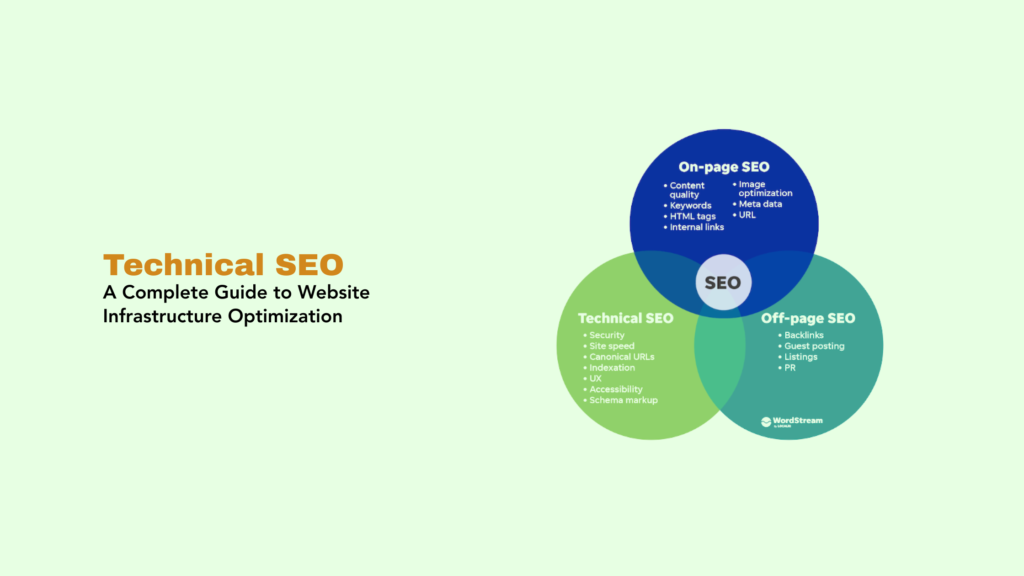
Technical SEO refers to the process of optimizing your website’s infrastructure, backend elements, and technical foundations to help search engines effectively crawl, index, and understand your content. Unlike content optimization or link building, technical SEO focuses on the “how” rather than the “what” ensuring search engine bots can access your site efficiently, pages load quickly, the site architecture is logical, and the technical environment supports rather than hinders search visibility. Technical SEO provides the foundation upon which all other SEO efforts rest.
While compelling content and quality backlinks drive rankings, technical issues can prevent even the best content from being discovered, indexed, or ranked properly. A technically sound website ensures search engines can efficiently process your content, users experience fast load times and smooth navigation, and the site meets modern search engine requirements like mobile-friendliness and secure connections. Technical SEO has become increasingly critical as Google’s algorithms prioritize user experience metrics like Core Web Vitals.
Navigate This Post
Why Technical SEO Matters
Search Engine Access
Technical SEO ensures search engine crawlers can access, discover, and index your content. Without proper technical foundations, even exceptional content remains invisible to search engines.
Crawl Budget Optimization
Large websites have finite crawl budgets—the number of pages search engines will crawl in a given timeframe. Technical SEO maximizes crawl efficiency, ensuring important pages are crawled frequently.
Page Speed and User Experience
Technical optimizations dramatically improve load times. Google considers page speed a ranking factor, and users abandon slow sites, impacting engagement metrics that influence rankings.
Mobile-First Indexing
Google primarily uses mobile versions for indexing and ranking. Technical SEO ensures mobile compatibility, responsive design, and optimal mobile performance.
Competitive Advantage
While competitors focus on content and links, technical excellence provides an edge. Sites with superior technical foundations outperform those with technical debt.
Foundation for Growth
Solid technical SEO scales efficiently as sites grow. Poor technical foundations become increasingly problematic as content volume increases.
Core Components of Technical SEO
1. Website Crawlability
Ensuring search engine bots can discover and access all important pages.
Key Elements:
Robots.txt File – Directs crawlers on which pages to access or avoid
User-agent: *
Disallow: /admin/
Disallow: /private/
Allow: /public/
Sitemap: https://example.com/sitemap.xml
XML Sitemaps – Provide search engines with organized lists of all important URLs
- Include priority and update frequency
- Submit to Google Search Console and Bing Webmaster Tools
- Update automatically when content changes
- Keep under 50,000 URLs per sitemap file
Internal Linking – Create clear pathways for crawlers to discover content
- Link from high-authority pages to important new content
- Ensure all pages are reachable within 3-4 clicks from homepage
- Use descriptive anchor text
- Fix or remove broken internal links
URL Structure – Create clean, logical URLs
- Use descriptive words: /blog/technical-seo-guide not /p?id=12345
- Keep URLs short and readable
- Use hyphens to separate words
- Avoid excessive parameters and dynamic URLs
2. Website Indexability
Controlling which pages search engines add to their index.
Indexing Directives:
Meta Robots Tags – Page-level indexing instructions
<!– Prevent indexing but allow following links –>
<meta name=”robots” content=”noindex, follow”>
<!– Prevent indexing and following links –>
<meta name=”robots” content=”noindex, nofollow”>
Canonical Tags – Specify preferred URL versions
<link rel=”canonical” href=”https://example.com/preferred-url/” />
Prevents duplicate content issues:
- HTTP vs HTTPS versions
- WWW vs non-WWW versions
- Parameter variations
- Paginated content
- Similar products
Status Codes – Proper HTTP response codes
- 200 (OK) – Page loads successfully
- 301 (Permanent Redirect) – Page permanently moved
- 302 (Temporary Redirect) – Page temporarily moved
- 404 (Not Found) – Page doesn’t exist
- 410 (Gone) – Page permanently removed
- 503 (Service Unavailable) – Temporary server issue
3. Site Speed and Performance
Optimizing page load times for better user experience and rankings.
Core Web Vitals – Google’s specific performance metrics:
Largest Contentful Paint (LCP) – Loading performance
- Target: Under 2.5 seconds
- Measures when main content becomes visible
- Optimize by compressing images, improving server response
First Input Delay (FID) / Interaction to Next Paint (INP) – Interactivity
- Target: Under 100ms (FID) or 200ms (INP)
- Measures responsiveness to user interactions
- Optimize by minimizing JavaScript execution
Cumulative Layout Shift (CLS) – Visual stability
- Target: Under 0.1
- Measures unexpected layout shifts
- Optimize by specifying image dimensions, avoiding injected content
Speed Optimization Techniques:
Image Optimization
- Compress images without quality loss
- Use modern formats (WebP, AVIF)
- Implement lazy loading for below-fold images
- Specify width and height attributes
- Use responsive images (srcset)
Code Optimization
- Minify CSS, JavaScript, and HTML
- Remove unused code and dependencies
- Defer non-critical JavaScript
- Inline critical CSS
- Enable compression (Gzip or Brotli)
Caching
- Implement browser caching
- Use CDN (Content Delivery Network)
- Enable server-side caching
- Leverage cache-control headers
Server Performance
- Choose quality hosting providers
- Use HTTP/2 or HTTP/3
- Optimize database queries
- Implement server-side rendering when appropriate
4. Mobile Optimization
Ensuring excellent mobile experiences as Google uses mobile-first indexing.
Responsive Design – Single site adapting to all screen sizes
- Fluid grids and flexible images
- CSS media queries for different breakpoints
- Touch-friendly navigation and buttons
- Readable text without zooming
Mobile Usability
- Minimum 16px font size
- 44×44 pixel touch targets
- Adequate spacing between interactive elements
- Avoid Flash and other unsupported technologies
- Fast mobile load times
Mobile-Specific Considerations
- Optimize for slower mobile connections
- Minimize pop-ups and interstitials
- Ensure forms are easy to complete on mobile
- Test on multiple devices and screen sizes
5. Website Security
Implementing HTTPS and security best practices.
HTTPS/SSL – Secure encrypted connections
- Google ranking signal since 2014
- Builds user trust (padlock icon)
- Required for PWAs and some modern features
- Prevents man-in-the-middle attacks
Implementation:
- Obtain SSL certificate (Let’s Encrypt is free)
- Install on server
- Update all internal links to HTTPS
- Implement 301 redirects from HTTP to HTTPS
- Update external properties (Google Analytics, Search Console)
Security Best Practices
- Keep CMS and plugins updated
- Use strong passwords and 2FA
- Implement security headers
- Regular malware scanning
- Firewall protection
6. Structured Data (Schema Markup)
Adding structured data to help search engines understand content context.
Benefits:
- Enables rich snippets (star ratings, prices, etc.)
- Improves content understanding
- Increases SERP visibility
- Supports voice search optimization
Common Schema Types:
- Organization
- Local Business
- Product
- Article
- Recipe
- Event
- FAQ
- Breadcrumb
Implementation:
<script type=”application/ld+json”>
{
“@context”: “https://schema.org”,
“@type”: “Article”,
“headline”: “Technical SEO Guide”,
“author”: {
“@type”: “Person”,
“name”: “John Smith”
},
“datePublished”: “2024-12-10”
}
</script>
7. Site Architecture
Organizing content logically for users and search engines.
Hierarchical Structure
- Homepage → Categories → Subcategories → Individual Pages
- Clear parent-child relationships
- Breadcrumb navigation showing hierarchy
- Flat architecture (important pages within 3 clicks)
Navigation Optimization
- Clear, descriptive menu labels
- Logical category grouping
- Search functionality for large sites
- Footer navigation for secondary pages
Internal Link Strategy
- Link from high-authority pages to new content
- Use contextual, relevant anchor text
- Create topic clusters around pillar content
- Distribute link equity strategically
8. International SEO
Optimizing for multiple languages and regions.
Hreflang Tags – Specify language and regional targeting
<link rel=”alternate” hreflang=”en-us” href=”https://example.com/en-us/” />
<link rel=”alternate” hreflang=”en-gb” href=”https://example.com/en-gb/” />
<link rel=”alternate” hreflang=”es” href=”https://example.com/es/” />
URL Structure Options:
- Subdirectories: example.com/fr/ (recommended)
- Subdomains: fr.example.com
- Country-code TLDs: example.fr
Considerations:
- Server location for target regions
- Currency and date format localization
- Cultural adaptation beyond translation
- Proper geotargeting in Search Console
Common Technical SEO Issues
Crawl Errors
Problem: Search engines can’t access important pages Causes: Server errors, broken links, incorrect robots.txt Solution: Monitor Google Search Console coverage report, fix server issues, update broken links
Duplicate Content
Problem: Multiple URLs with identical or very similar content Causes: Parameter variations, HTTP/HTTPS, WWW/non-WWW, printer-friendly versions Solution: Implement canonical tags, 301 redirects, parameter handling in Search Console
Slow Page Speed
Problem: Pages load too slowly, hurting user experience and rankings Causes: Unoptimized images, bloated code, poor hosting, no caching Solution: Compress images, minify code, upgrade hosting, implement caching and CDN
Mobile Usability Issues
Problem: Poor mobile experience despite responsive design Causes: Small text, close tap targets, viewport not configured, mobile redirects Solution: Fix mobile-specific issues identified in Search Console, test on real devices
Redirect Chains
Problem: Multiple redirects (A→B→C→D) before reaching final destination Causes: Sequential site migrations, URL structure changes without updating redirects Solution: Update all redirects to point directly to final destination
Missing or Incorrect Schema
Problem: Structured data not implemented or contains errors Causes: Implementation mistakes, outdated schema, missing required properties Solution: Test with Google Rich Results Test, fix validation errors, add recommended properties
Orphan Pages
Problem: Pages with no internal links pointing to them Causes: Poor site structure, removed navigation links, new content not integrated Solution: Add internal links from relevant existing content, update navigation, improve site structure
Technical SEO Tools
Google Search Console
Essential Features:
- Crawl statistics and errors
- Index coverage reports
- Mobile usability reports
- Core Web Vitals data
- Enhancement reports (structured data, breadcrumbs)
- Security issue alerts
Google PageSpeed Insights
Provides:
- Performance scores (0-100)
- Core Web Vitals metrics
- Specific optimization recommendations
- Mobile and desktop analysis
Screaming Frog SEO Spider
Capabilities:
- Comprehensive site crawls
- Identifies technical issues
- Analyzes meta tags and headers
- Finds broken links
- Extracts structured data
- Generates XML sitemaps
SEMrush Site Audit
Features:
- Automated technical audits
- Issue prioritization
- Historical tracking
- Comparison reports
- Integration with other SEMrush tools
Ahrefs Site Audit
Benefits:
- Health score monitoring
- Issue categorization by severity
- Performance tracking over time
- Internal link analysis
Technical SEO Best Practices
1. Regular Audits – Conduct comprehensive technical audits quarterly to catch issues early.
2. Monitor Core Web Vitals – Track performance metrics monthly and address degradation promptly.
3. Test Before Deploying – Use staging environments to test technical changes before production.
4. Mobile-First Approach – Design and optimize for mobile experiences first.
5. Prioritize Issues – Address critical technical issues (crawl errors, security) before minor optimizations.
6. Document Changes – Maintain records of technical implementations for troubleshooting and knowledge transfer.
7. Stay Updated – Follow search engine blogs and industry news for algorithm updates and new requirements.
8. Balance Optimization – Don’t sacrifice user experience for technical perfection; find practical middle ground.
Conclusion
Technical SEO forms the essential foundation enabling search engines to effectively crawl, index, and rank your content while providing users with fast, secure, and accessible experiences. Without solid technical foundations—proper crawlability, fast page speeds, mobile optimization, structured data, and clean site architecture—even exceptional content and strong backlink profiles cannot achieve their full potential.
As search engines increasingly prioritize user experience metrics like Core Web Vitals and mobile-friendliness, technical SEO has evolved from optional optimization to mandatory requirement. The complexity of modern websites demands ongoing attention to technical health through regular audits, performance monitoring, and proactive issue resolution.
Success in technical SEO requires both immediate issue remediation and long-term strategic planning. Address critical problems like crawl errors and security issues immediately, while systematically improving performance, implementing structured data, and optimizing site architecture over time. The investment in technical excellence pays dividends through improved rankings, enhanced user experience, and scalable growth capacity that supports your site’s evolution.
Key Takeaway: Technical SEO optimizes website infrastructure, backend elements, and technical foundations—including crawlability, indexability, page speed, mobile-friendliness, security, structured data, and site architecture—to ensure search engines can effectively crawl and index content while users experience fast, secure, accessible sites. As the foundation for all SEO efforts, technical optimization enables content and links to achieve their full potential while meeting modern search engine requirements like Core Web Vitals and mobile-first indexing.







